 What Bit is Your Smartphone Running... 64-bit or 32-bit Operating System?
Android user’s life when an
important question has to be
answered: is my device
running a 32- or 64-bit
operating system? It can be a rough, troubling time if you’re
not sure how to answer that
question. But we’re here for
you, and we’ll help walk you
through what to do should such
a scenario arise. Just breathe, it’s going to be fine.A lot of us really don’t care
what bit our Android runs nor
the operating system version.
What we care about is good
spec, slay camera to capture
the slay queen and good battery life. But there is something I think
you should know… the bit your smartphone is running; is it 64-bit or 32-bit operating
system? I know some of you
will be thinking is my Android now a Laptop? Yes! A portable device that can do
everything you can do on
system.
So, the first thing you’ll want
to do is download and
install AnTuTu Benchmark. We’re not going to run any
benchmarks here, just use it to
get some processor
information.

What Does 32- and 64-bit
Mean? When a processor is labelled
as 32- or 64-bit, it’s referring
to the amount of values that
can be stored on that
particular processor’s
register. A 32-bit processor has room for 2^32 values
(around 4 billion, rounded
down), while a 64-bit
processor can store 2^64 of
them (18 quintillion, rounded
down). This means that 64- bit processors have four
billion times more addresses
at their disposal than 32-bit
processors – a clear
improvement! Advantage of 64-bit Android
Processor over 32-bit 1. 64-bit phones will do everything better and last
longer 2. 64-bit phones can handle more memory: 32-
bit can handle upto 4GB
ram while 64 bit can
handle more than that. 3. 64-bit phones run your existing apps faster Is my Smartphone 64-bit or
32-bit? There is a simple way to
know
>>Go to Google Play store and
download Antutu benchmark

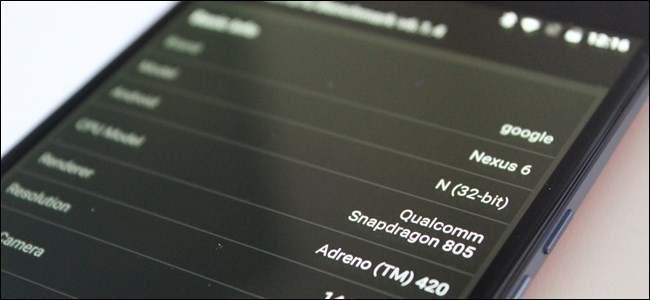
Find the line labeled “Android”
in this list—it should be the
third entry. To the right of this,
it will show the Android
version you’re running and
what bit the OS is.
>>Find the line labeled
“Android” in this list - To the right of this, it will show the
Android version you’re
running and what bit the OS
is.
>>You should see the bit your
device is running. When next you are ask if your
smartphone runs 32-bit or 64-
bit operating system, I guess
you’ll know the answer to
give without thinking twice. Now tell us, Is your
smartphone running 64-bit or
32-bit operating system and
what type of device is that?

 that’s it. That is literally
it. See? You were stressed for
nothing.
By: Adeniyi Taiwo

No comments:
Post a Comment